Christie Klezmer
AMS360 Personal Lines Training
.png)
This curriculum consists of 4 modules where the user will advance through a serious of micro-lessons, AMS360 system demonstrations, knowledge checks, and scenario-based activities to solidify content knowledge and execute mastery of system navigation and application.
Responsibilities: Instructional Design, eLearning Development, Visual Design, Storyboard, Scripting, Visual Mockups, Action Mapping, LMS Integration, and Programming.
Target Audience: Brightway Insurance Agency Owners, Producers, and Field Staff
Tools Used:
• Articulate Storyline 360
• Vyond
• BandiCut
• Adobe Illustrator
• Adobe Photoshop
• MindMeister
Step 1: AMS360 Navigation
Step 2: Customer Entry
Step 3: Quote Workflow
Step 4: New Business Workflow
Overview
This curriculum is directed toward all Agency Owners and Franchise Staff that need to operate within Brightway's Agency Management System- AMS360. AMS360 is a system that all Franchise employees must know how to use and manipulate to help grow their business and keep track of all customer records. This system is complicated for most first time users, as there are so many components and proper ways to enter information.
Prior to the creation of this elearning solution, the training team had been assigning a text-based course with an overload of information condensed into 7 lessons. The users had to complete the 3-hour training in order to move on to a customer scenario activity. What the trainers experienced was a lack of retention of the information learned throughout the course and the inability to think critically and apply the knowledge to a real-time customer scenario. It became apparent after review of agency-owner entries into AMS360 that the issue was with the consumption of learning materials. This led to the creation of this curriculum, providing a self-directed and diversified scenario-based learning solution to alleviate the obvious gaps in understanding.
In this curriculum, the user will advance through guided instruction demonstrations, real-world examples, scenario-based application and activities, pre-check assessments, formal final assessments, and varied instructional strategies that appeal to all learning styles.
The Process
Action Map
At this point, I had identified the problem, and decided there needed to be a simplified, yet comprehensive learning solution. I examined existing courses and manuals to create the most streamline way to deliver the "need-to-know" information with a real-world approach that would be relatable to all agencies. I collaborated with team members to further solidify the "pain-points" of the target group and the training team, as well as examples of correct engagement practices.

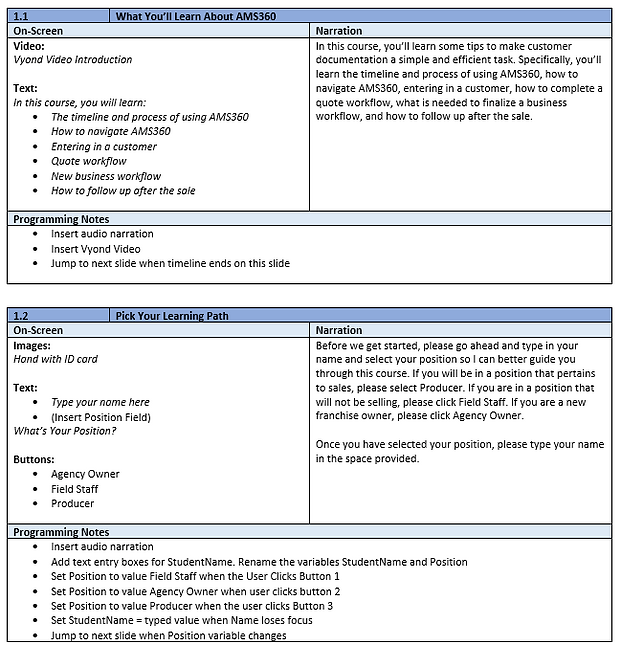
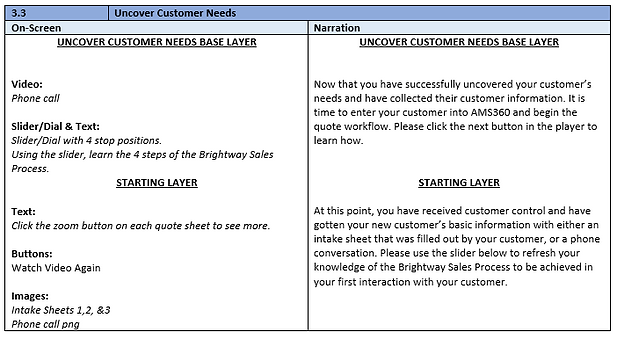
Text-Based Storyboard
When creating the storyboard, I strived to make all system demonstrations and applications more relatable to what the user would most likely experience. Lessons were crafted around a certain customer that was followed throughout the curriculum. Relevant information about performance and system practices were integrated into each scenario and micro-lesson. Each lesson heavily focused on self-directed navigation to propel the user through the course.
The user would go through the learning experience in real-time, having to adhere to the customer scenario system requirements as they advance through the training.

Visual Mockups
Once the text-based storyboard was complete, I contacted Brightway Marketing team's Graphic Designer to get the color scheme layout. I also asked for any Brightway Icons that I could include. I had decided that all visuals would be icons or animations. I proceeded to find all SVGs that I intended to use for each lesson and sent them over with some instructions to the Graphic Designer on how I would need certain graphics to look and how I would need them separated to function.

Development & The Learning Experience
After getting the final bits of feedback on the storyboard and applying last on-screen text edits, I moved into Storyline 360 to begin building out the framework for the course. Because this e-learning had become so in-depth, I decided to make it more personalized, interactive, and fun for the user by adding gamification elements like the opening slide with game-board designed modules. I programmed these slides to keep track of the learner's progress as well as the user's position and name. This required the use of variables, animations, motion paths, triggers, and states.

I kept this theme going by giving each module it's own individual lesson tracker. Each module opens with a micro-lesson overview to gear the learner toward the information they will begin applying in the upcoming activities. Each lesson goes into a more topic focused micro-lesson itself. This is either through a video-captured demonstration or a Vyond video lesson that was imbedded into Storyline. I used triggers, layers, and states to create seamless interactions between the two platforms.


Each module lesson gives a pre-check assessment to ensure the user has been following along with the lessons and does not progress through the course without lesson mastery. If the learner does not perform above an 80%, they are redirected back to the lesson portion and given the activity over again. Most activities have some guiding prompts for navigation or information entry purposes, but for the most-part, prompts are kept to a minimum when possible. This is to confirm the learner is applying previously learned information and navigating through the customer scenario critically. I used hot spots, screen recording captures and quizzes, free-form slides, variables, layers, states, triggers, and voiceovers to make these sections come together.
Once the user has made it past all pre-check assessments and lessons, the user will take a final assessment to validate all information has been retained and the most imperative subjects are assessed before moving on to the next module, where they will build upon their understanding.

Final Product
Once getting approval on functionality, the program was sent out to Brightway's Quality Control department and the Training Team to get further feedback. I have received a lot of support and excitement about how much further this will carry the new Agency Owners and their staff in their ability to use AMS360.
The Training Team is excited to implement this training as soon as possible. By doing so, this will eliminate the requirement by the training team to follow-up on the completion of the previous text-based customer scenario activity. It also eliminates the responsibility of the training team to grade customer scenario submissions in AMS360, freeing up more of their time for facilitation. They believe more of Brightway's e-learning solutions should model this course, and have requested an over-hall of all existing materials.
The Quality Control department added additional notes for making this course even more successful and informative. It is my priority to keep e-learning materials streamlined and user-friendly without overloading the learner. I continue to make adjustments to improve the functionality and comprehension of this specific e-learning experience with the learner in mind, using feedback provided from all teams involved in the process.